Excel & Google Sheets · free version included
A quote tracking spreadsheet that shows who to follow up today
A quote follow up spreadsheet for Excel and Google Sheets. Add each quote you send. It works out your day 2, 7 and 14 follow-up dates, lists who is due today, and writes the message for you to copy. No account, no subscription, and your quotes stay in your own file.
Quotes go quiet when nobody tracks the next step
You sent the quote. Then the week got busy and it went quiet. A quote without a next follow-up date is easy to forget, and a plain spreadsheet only helps if you remember to open it and work out who is due.
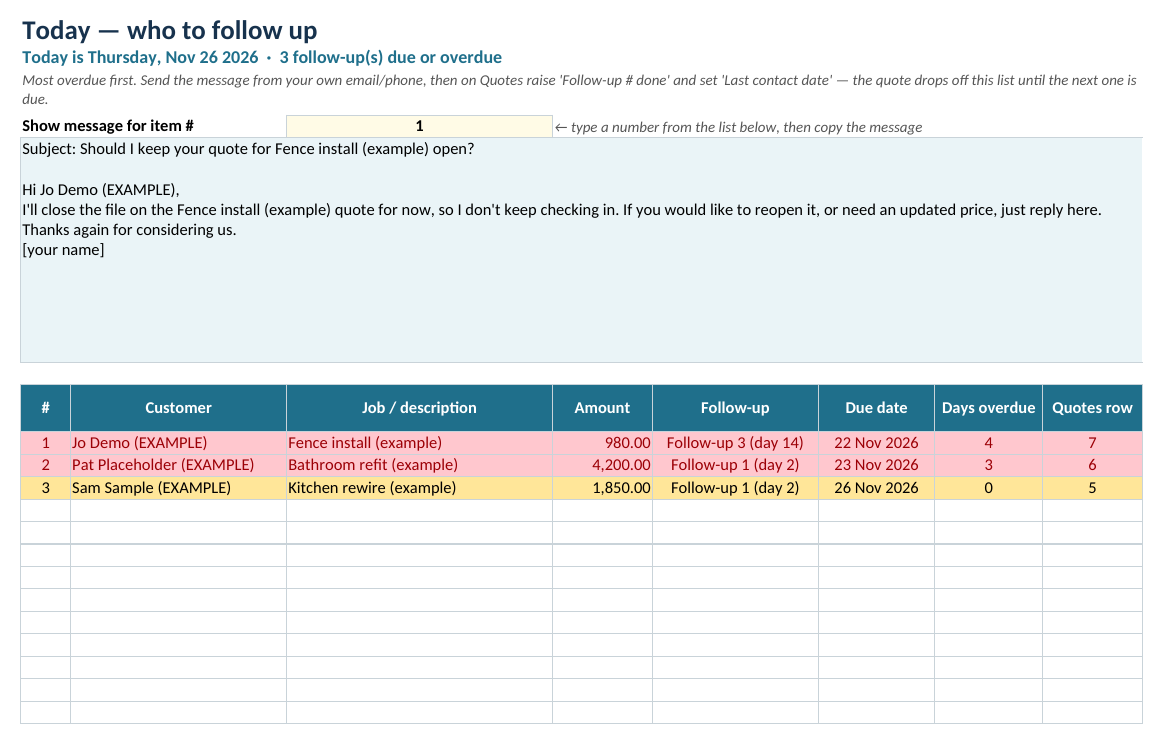
This template does that part for you. Type the date you sent the quote, and the sheet shows the next follow-up date, highlights what's due or overdue, and gives you a short message to send from your own email or phone. It does not send anything for you, and it is not a CRM.
What's inside the $12 template
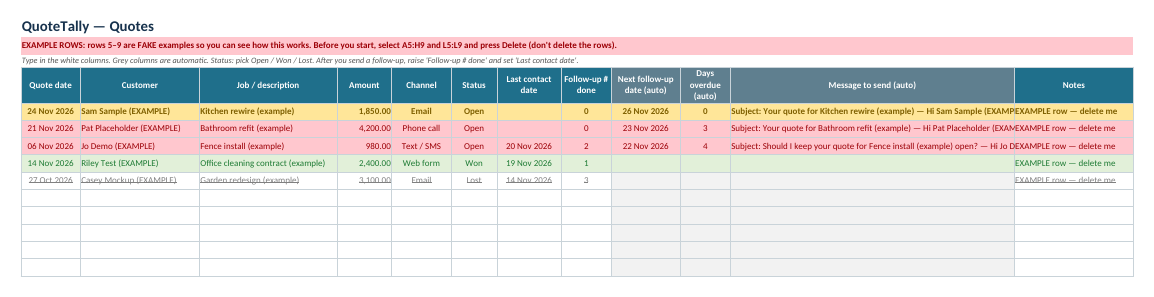
Quotes tab
One row per quote: quote date, customer, job, amount, channel, status (Open / Won / Lost), last contact date, follow-ups done. It fills in the next follow-up date, days overdue and the message to send. Due today is highlighted amber, overdue is red. 500 rows are ready to use, with dropdowns so entries stay tidy.
Today tab
The quotes due today or overdue, most overdue first, with the message ready to copy.
Templates tab
Short day 2, day 7 and day 14 messages, plus a final "closing the file" note. Edit them to sound like you; the Quotes tab fills in the customer, job and date.
Dashboard tab
Open quotes and their value, won and lost counts and value, win rate, and follow-ups due this week. Everything is worked out from your own entries, nothing is pre-filled.
Settings tab
Change the follow-up days (2 / 7 / 14 by default), the minimum gap after you last contacted someone, your name, and the channel list.
Start Here tab
How to use it, how statuses work, and how to open it in Google Sheets or Excel (about 5 minutes to set up, our estimate).
The file includes 5 clearly labelled example rows so you can see how it looks. Clear them before you start.
Free vs $12
| Free | $12 Pro | |
|---|---|---|
| Price | $0 | $12, one-time |
| Quotes tab with next follow-up date (day 2, 7, 14) | Yes | Yes |
| Due today / overdue highlighting | Yes | Yes |
| Open / Won / Lost status | Yes | Yes |
| Day 2, 7 and 14 message templates | Yes (copy and edit by hand) | Yes (editable, plus a final "closing the file" note) |
| Messages filled in with customer, job and date | — | Yes |
| Today tab: who to chase, most overdue first | — | Yes |
| Dashboard: open value, won/lost, win rate, due this week | — | Yes |
| Settings: change the follow-up days, your name, channels | — | Yes |
| Last contact date, days overdue, channel | — | Yes |
| Rows ready to use | 100 | 500 |
| Works in Excel and Google Sheets | Yes | Yes |
Free version
$0
Quotes tab, follow-up dates, highlighting and the message templates. 100 rows.
Download the free versionFull template
$12 one-time
Everything in free, plus the Today tab, filled-in messages, Dashboard, Settings and 500 rows.
Buy the template — $12How ordering works
- Click Buy the template — $12. A pre-filled email to us opens. Send it.
- We reply with a PayPal invoice for $12.
- After you pay, we email you the
.xlsxfile. - Open it in Excel, or import it into Google Sheets (File > Import > Upload).
It's a one-time payment, not a subscription. If your email app doesn't open, write to sq9k70wm@mail.grokbot.com with the subject "I want to buy the $12 quote tracker template — QuoteTally".
Refunds
Yes. If you change your mind within 14 days of payment, email us at sq9k70wm@mail.grokbot.com and we will refund the $12 through PayPal to the original payment method. No questions asked.
FAQ
Does it work in Google Sheets or Excel?
Both. It's a standard .xlsx file. In Excel, just open it. In Google Sheets, go to File > Import > Upload and choose "Replace spreadsheet". The formulas, dropdowns and highlighting come across. It uses only functions that both support.
Does it work offline?
In Excel, yes — it's an ordinary file on your computer. Google Sheets needs an internet connection unless you've turned on Google's offline mode for Drive. Dates update when you open the file.
Is my data private?
We never see it. The file is yours: it lives on your computer, or in your own Google account if you import it into Google Sheets. We don't ask for your customers' contact details, and there is nothing to sign in to.
What's the difference between the spreadsheet and the QuoteTally web tool?
Both do the same job with the same day 2, 7 and 14 messages. The web tool is quicker to start — no file, one click to copy a message, data kept in one browser. The spreadsheet is a file you own: you can change the columns, the message wording and the follow-up days, use it in Excel or Google Sheets, share it with a teammate in Google Sheets, and keep it in your own backups. The spreadsheet has no one-click copy: you copy the message from the cell.
Does it email my customers?
No. You copy the message and send it yourself from your own email or phone.
Can I change the follow-up days or the messages?
Yes. The days are on the Settings tab and the wording is on the Templates tab.
Will it win back every quiet quote?
No. A clear, short follow-up can help a quote get an answer instead of going silent, but it can't promise a signed job. If someone says no or asks you to stop, stop.
Can my team use it?
If you import it into Google Sheets, you can share it with teammates like any other sheet. The Excel file is a single file, so only one person can use a copy at a time.
Can I get a refund?
Yes, within 14 days of payment — see Refunds above.