Quote template · Excel & Word · free version included
Quote and estimate templates for small service businesses
A good quote template makes the price easy to read and the next step easy to take. Download a free one in Excel and Word. The Excel version works out line totals, tax, a deposit and a valid-until date, and both versions have a terms block and a signature block. Need one for your trade? The $9 pack has six: cleaning, handyman and contractor, landscaping, photography, web and design freelancers, and a generic one.
How to write a quote that gets a reply
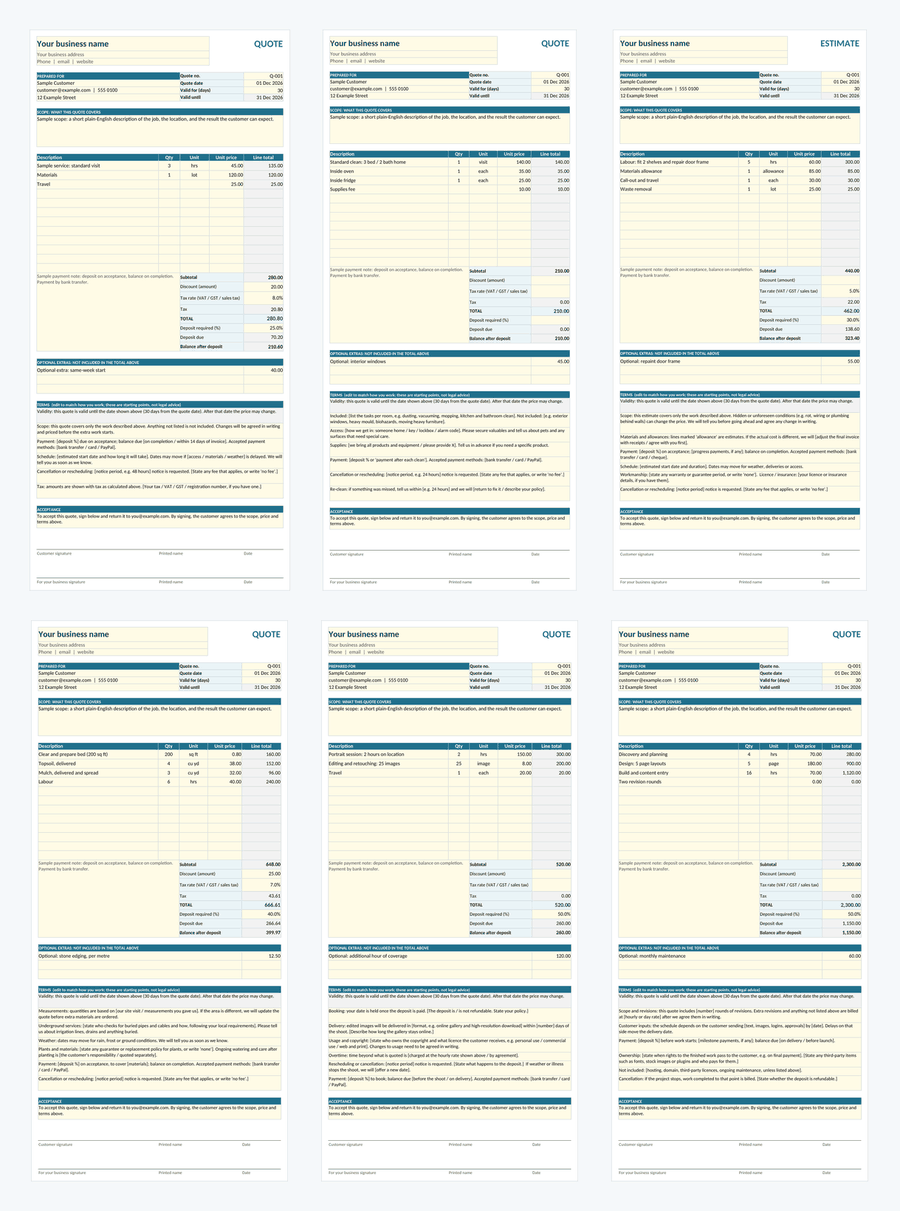
What a good quote template includes
Whatever your trade, a clear quote has the same parts. Each template here has them in the same order, so you can check nothing is missing before you send.
- Your details and a quote number. Who it is from, and a reference you can both use later.
- Customer and job address. So the customer can see you have the right place.
- Quote date and a valid-until date. When the price was set and how long it holds. Only promise a date you can honour.
- A short scope. What the quote covers, in the customer's own words.
- Line items. A description, quantity, unit and price for each thing you will do or supply.
- Totals. Subtotal, any discount, tax, total, deposit and balance.
- Optional extras. Things the customer may want, priced but kept out of the total.
- Terms and acceptance. A few plain rules on payment, changes, schedule and cancellation, and a place to sign or say yes.
The free quote template (Excel and Word)
The free download is one generic quote template in two formats, in a single zip. There is no email form and no account.
In the Excel version, you type the quantity, unit and unit price for each line. The line totals, subtotal, tax, total, deposit due and balance after deposit fill in for you. Type the quote date and the number of days the quote is valid, and the valid-until date is worked out. Leave the quantity blank for a fixed price. In the Word version, the layout is the same, and you type the amounts.
Download the free quote template (zip)
Quote templates by trade
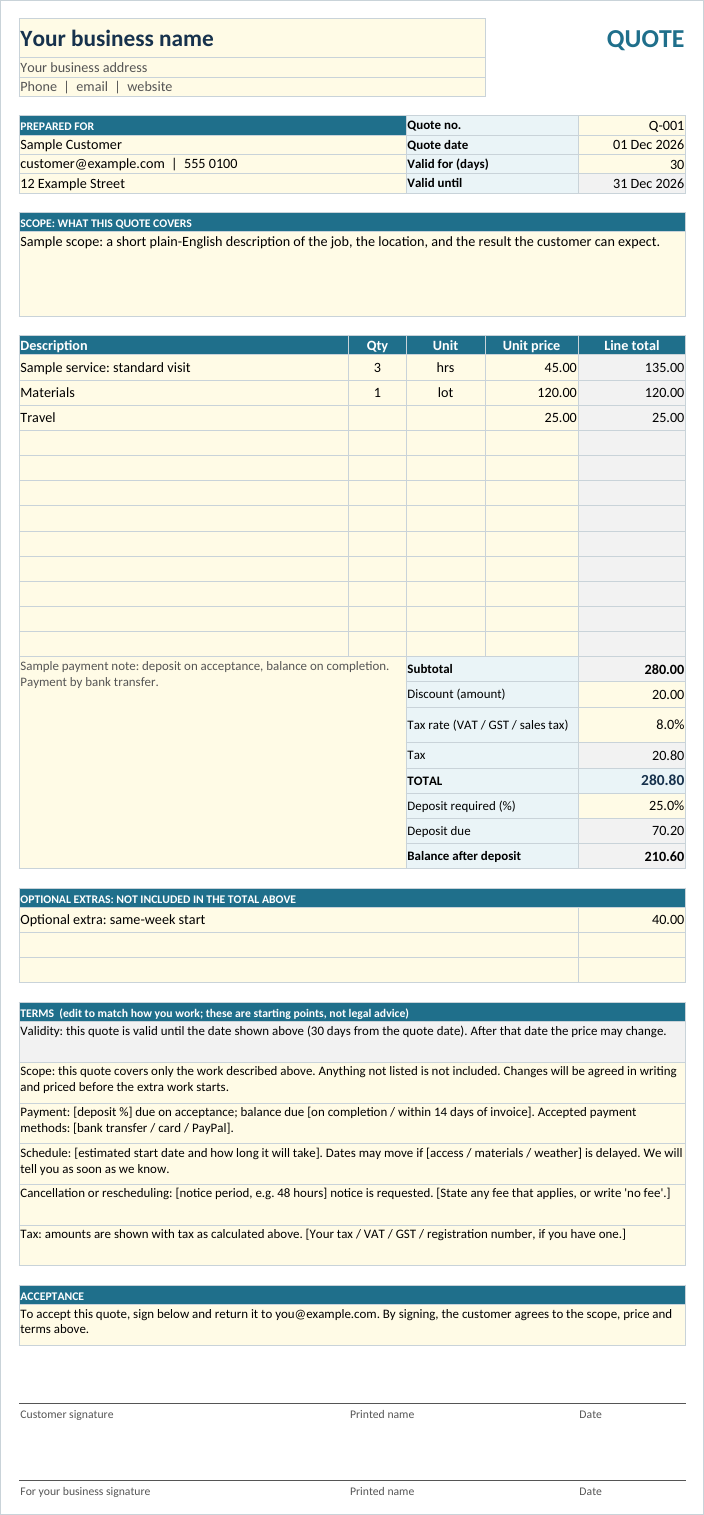
The generic template is a good start. The trade versions add the line items and terms that people in that work usually need, with [brackets] for your own choices.
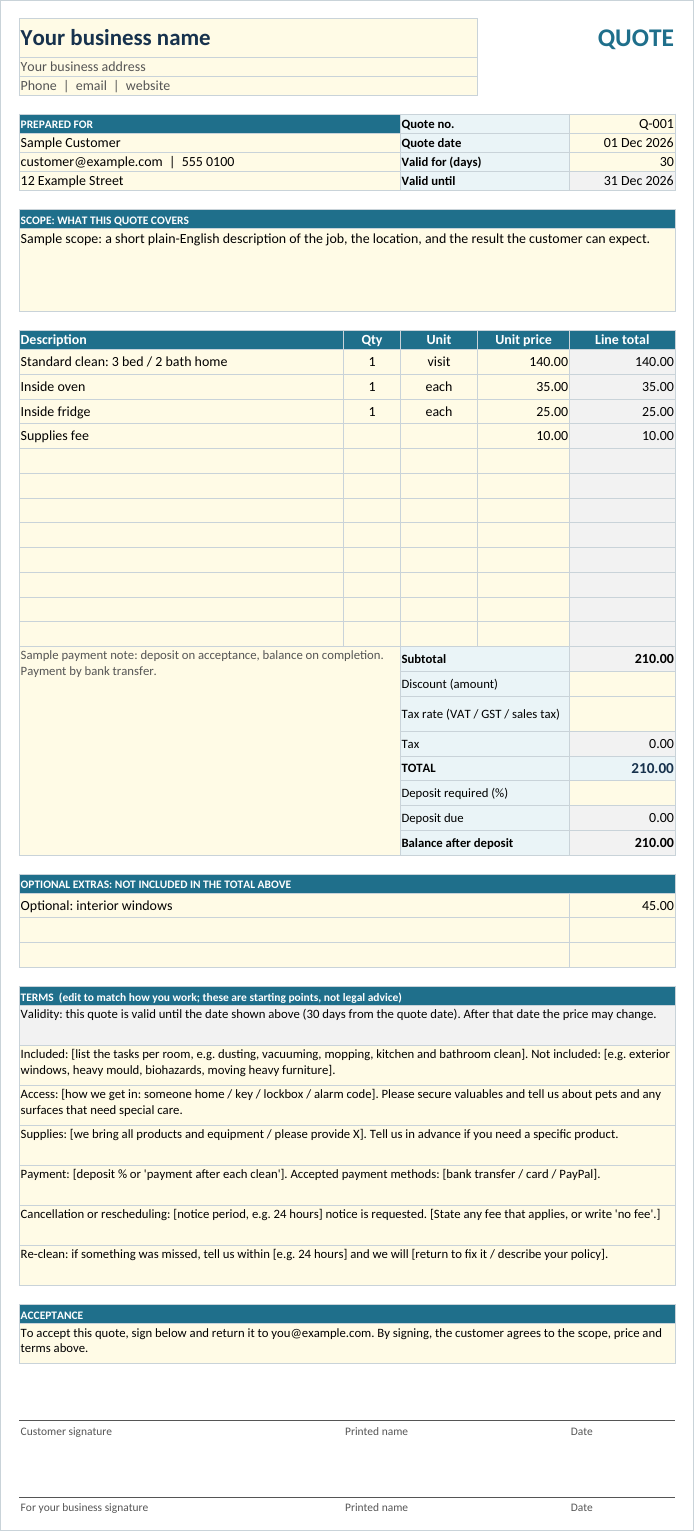
Cleaning quote template
For homes and offices. The scope box asks for the property, size and how often. The terms cover what is included and not included, access and keys, supplies, cancellation and a re-clean policy.
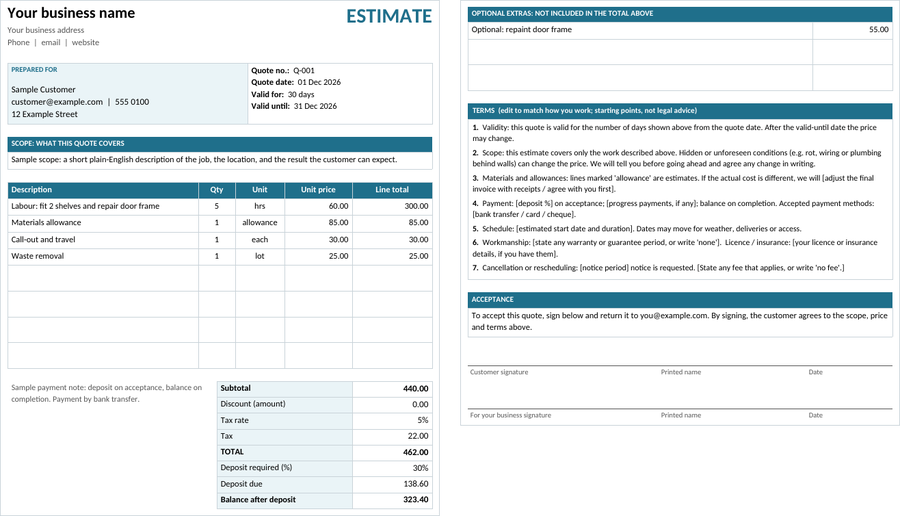
Handyman and contractor estimate template
Titled ESTIMATE. Lines for labour, a materials allowance, call-out and waste removal. The terms cover unforeseen conditions, how allowances are settled, payment stages and workmanship. If you also want to know what to send after the estimate, see quote follow-up for contractors.
Landscaping quote template
Lines in square feet or metres and cubic yards or metres, with measurement and weather terms, a note on buried services, and a place for your plant guarantee.
Photography quote template
Coverage, editing, prints and travel, with terms for a deposit to hold the date, delivery time, usage and copyright, and overtime.
Freelance design and web quote template
Discovery, design, build and revisions, with terms for how many revision rounds are included, what the customer must supply, milestone payments and when ownership passes.
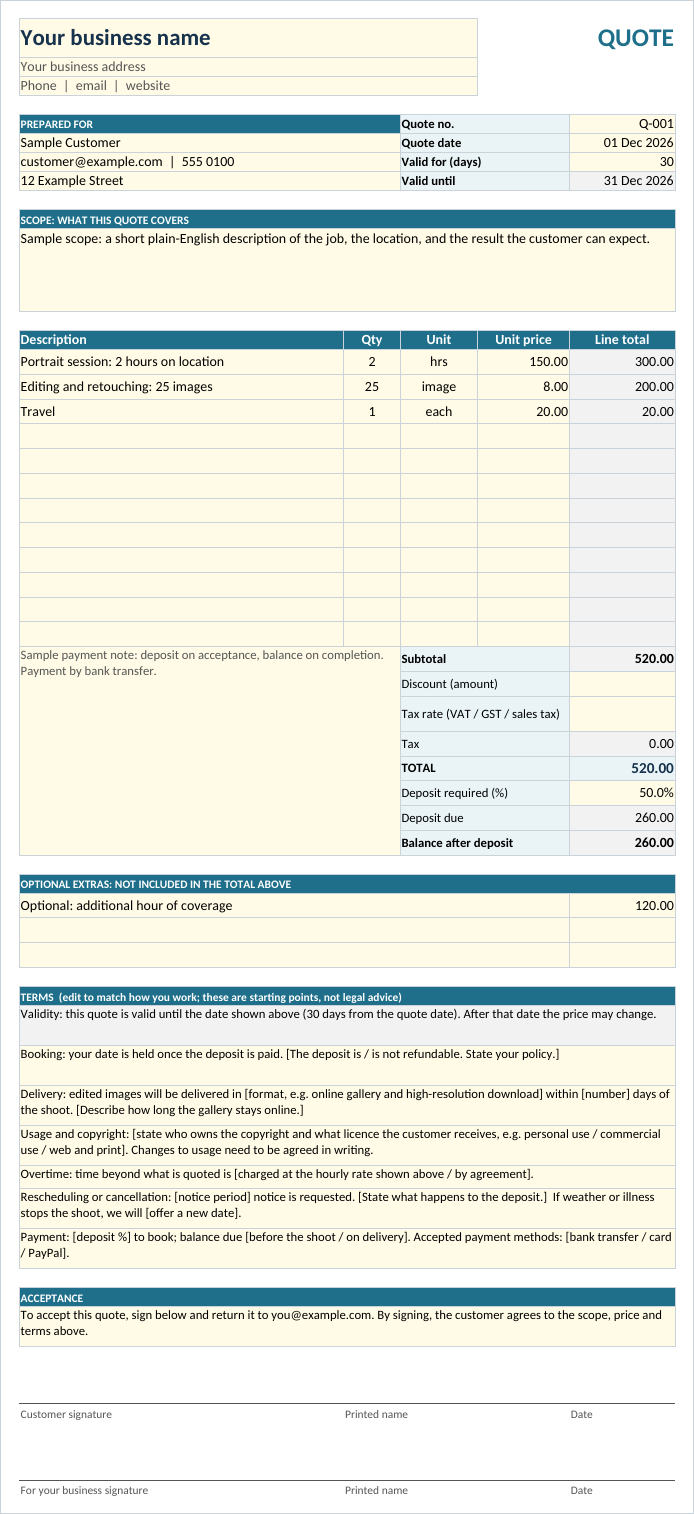
Sample numbers for illustration only.
Word or Excel?
Use Excel if you want the sums done for you. It is also the one to open in Google Sheets. Use Word if you prefer a document that looks like a letter and you are happy to type the amounts. Many people keep both: do the sums in Excel and paste the numbers into Word. Either way, save the finished quote as a PDF before you send it.
Quote or estimate?
In some places and trades, a quote is a firm price and an estimate is a best guess. In others the words mean the same thing. Use the word that matches what you are offering, and say clearly in the terms what could change the price. Every template lets you change the title with one edit.
Optional add-on
Quote & Estimate Templates Pack: $9
The free template is a good start. The pack gives you a version for your trade. It has six quote templates, each in Excel and Word (twelve files): cleaning, handyman and contractor, landscaping, photography, web and design freelancer, and a generic one. Each has automatic line totals, tax, deposit and a valid-until date in the Excel version, optional extras, a terms block written for that trade, and an acceptance and signature block. It also includes a short PDF guide, How to write a quote that gets a reply. $9, one-time, not a subscription. The pack is not available as a site download.
How ordering works
- Click Buy the templates pack — $9. A pre-filled email to us opens. Send it.
- We reply with a PayPal invoice for $9.
- After you pay, we email you the pack.
If your email app doesn't open, write to sq9k70wm@mail.grokbot.com with the subject “I want to buy the $9 quote templates pack — QuoteTally”.
Refunds
If you change your mind within 14 days of payment, email us at sq9k70wm@mail.grokbot.com and we will refund the $9 through PayPal to the original payment method.
Send it, then follow up
A quote that goes quiet usually just needs a clear, short follow-up. When you send a quote, write down the next follow-up date.
- Copy-ready messages for day 2, 7 and 14: quote follow-up email templates
- When to send each one, and when to stop: how to follow up on a quote
- Free follow-up scripts to download: free scripts PDF
- A list of who is due today, in your browser, free for 10 active quotes: QuoteTally
- The same dates in Excel or Google Sheets: quote tracking spreadsheet
FAQ
Is there a free quote template I can download?
Yes. The free download is one generic quote template in Excel and in Word, in a single zip. You don't need to give an email address or create an account. The Excel version works out line totals, tax, a deposit and a valid-until date for you. The Word version has the same layout, and you type the amounts.
What is the difference between a quote and an estimate?
In some places and trades, a quote is a firm price for a defined job and an estimate is a best guess that can change. In other places the words are used interchangeably, and sometimes the difference has legal weight. Use the word that matches what you are offering and check your local rules if you are unsure. You can change the title on any of the templates from QUOTE to ESTIMATE.
Do the totals calculate automatically?
In the Excel files, yes. You type quantities, units, unit prices, a tax rate and a deposit percentage, and the line totals, subtotal, tax, total, deposit and balance fill in. The Word files use the same layout, but Word does not calculate, so you type the amounts. A simple way is to work out the totals in the Excel version and copy them across.
Will the Excel template work in Google Sheets?
Yes. In Google Sheets choose File, then Import, then Upload, and pick Replace spreadsheet. The formulas use only basic functions (IF, ROUND, SUM and OR) that Excel, Google Sheets and LibreOffice all support.
Can I change the terms and wording?
Yes, and you should. The terms in each template are starting points written for that trade, with [brackets] for the choices only you can make. They are not legal or tax advice, so check them against your local rules, your insurance and how you actually work.
What do I get in the $9 pack, and how do I order?
You get six quote templates, each in Excel and in Word (cleaning, handyman and contractor, landscaping, photography, web and design freelancer, and a generic one), plus a short PDF guide called How to write a quote that gets a reply. Click Buy the templates pack and send the pre-filled email. We reply with a PayPal invoice for $9, and after you pay we email you the pack. It is a one-time payment, not a subscription.
Can I get a refund on the $9 pack?
Yes. If you change your mind within 14 days of payment, email us at sq9k70wm@mail.grokbot.com and we will refund the $9 through PayPal to the original payment method.
Does QuoteTally send my quotes to customers?
No. The templates are files you fill in and send yourself from your own email or phone. The QuoteTally web tool is a separate, optional list that shows which quote is due for a follow-up today, and it does not email your customers either.
Related guides
- Quote follow-up email templates: copy-ready day 2, 7 and 14 messages.
- How to follow up on a quote: when to send each note, and when to stop.
- Quote follow-up for contractors: estimate follow-up for the trades.
- Quote tracking spreadsheet: who is due for a follow-up today, in Excel or Google Sheets.